
Have you heard people talk about AI tools but felt confused about where to start? You are not alone. If you want to know how to use Google Gemini, you have come to the right place. This guide will walk you through everything — from what Google Gemini is, to the many Google Gemini uses that can help you in school, at work, and in daily life.
Whether you are a 15-year-old student doing homework, a college graduate writing reports, or a working professional who wants to save time — learning how to use Google Gemini can truly change the way you work and think.
“Google Gemini is like having a very smart friend available 24/7 — one who can write, code, explain, and create alongside you.”
What Is Google Gemini?
Google Gemini is an AI assistant made by Google. Think of it as a very smart chat tool that can understand your questions and give you helpful answers. It is not just a search engine — it can write essays, explain topics, make plans, read images, and even write computer code.
Before we dive into how to use Google Gemini, it helps to know that there are different versions. Gemini (free) is available to everyone with a Google account. Gemini Advanced is a paid upgrade with more power. For beginners, the free version is more than enough to get started with all the basic Google Gemini uses.
💡 QUICK FACT Google Gemini was previously called “Google Bard.” Google renamed and upgraded it to Gemini in early 2024, making it one of the most powerful AI assistants available to the public today.
How to Use Google Gemini — Getting Started
● BEGINNER LEVEL
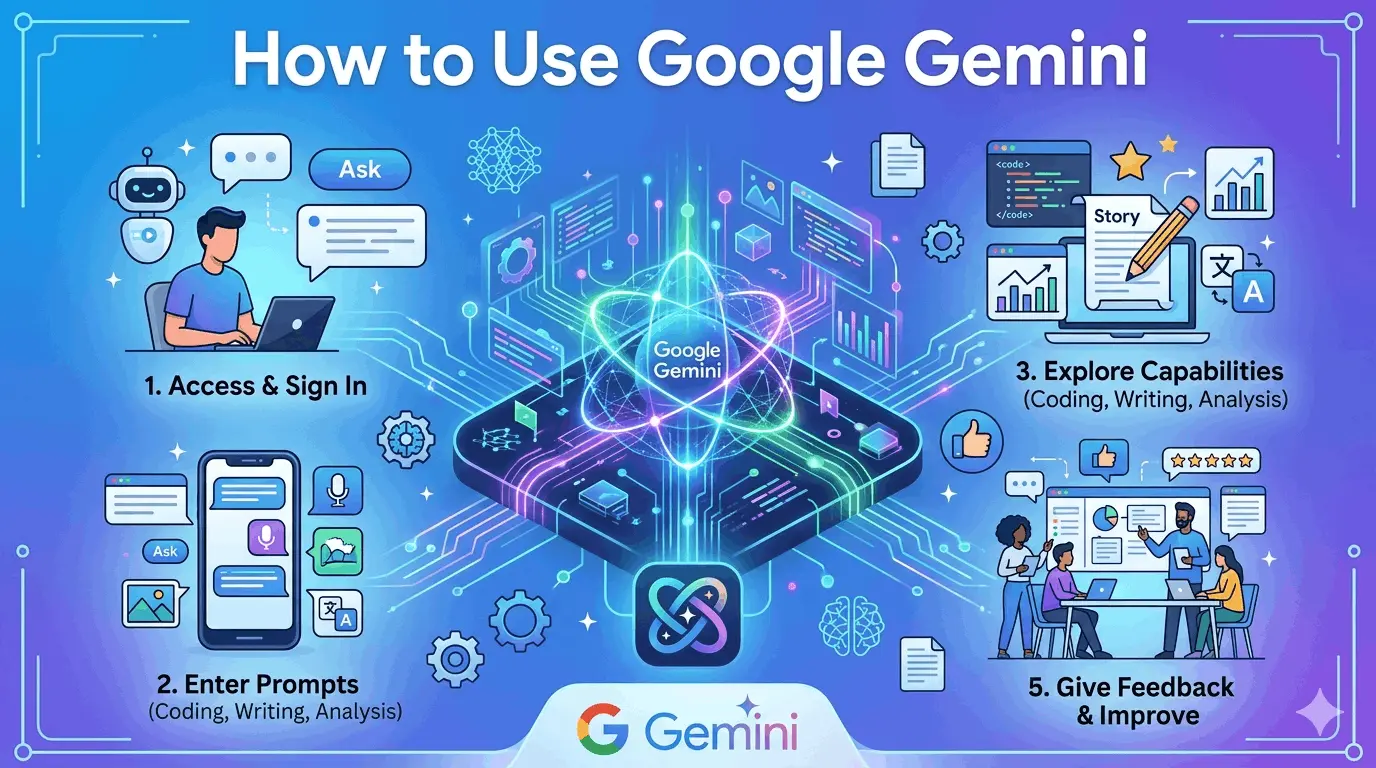
The first step to learning how to use Google Gemini is simply opening it. You do not need to download any app on your computer. Just follow these four easy steps:
| 1 | Open Your Browser Go to gemini.google.com on Chrome, Firefox, or any browser you use. |
| 2 | Sign In with Google Use your Gmail account to log in. If you do not have one, create a free Google account first. |
| 3 | Type Your First Question Click the chat box and type anything — “Explain photosynthesis in simple words.” Then press Enter. |
| 4 | Read and Follow Up Read the reply. If you want more detail, just keep typing in the same chat. It remembers your conversation. |
That is really it! Now you understand the basics of how to use Google Gemini. The hardest part is just asking your first question — everything else feels natural after that.
Google Gemini Uses — What Can It Actually Do?
● BEGINNER — INTERMEDIATE
One of the most common questions people ask is: “What are the real Google Gemini uses?” The answer is — a lot more than most people expect. Here are the most popular things people do with it every day:
| ✍️ Writing Help Essays, emails, cover letters, social media captions | 📚 Study Aid Explain tough topics, summarize chapters, quiz yourself |
| 💻 Coding Write, fix, and explain code in any language | 🖼️ Image Reading Upload a photo and ask Gemini to describe or analyze it |
| 📋 Planning Travel plans, study schedules, project timelines | 🌍 Translation Translate text into many languages quickly and clearly |
Understanding how to use Google Gemini for writing is one of the biggest time-savers. For example, a student can type: “Write a short essay about climate change for Class 10 in simple English.” Gemini will produce a clean, well-structured essay in just a few seconds.
How to Use Google Gemini the Smart Way
● INTERMEDIATE LEVEL
Once you are comfortable with the basics, it is time to go deeper. The real secret to how to use Google Gemini at a higher level is learning how to write better prompts. A prompt is just the message or question you type. The better your prompt, the better Gemini’s reply.
Tips for Better Prompts
Be specific. Instead of asking “Tell me about marketing,” try: “Give me 5 digital marketing strategies for a small clothing business with a low budget.” Knowing how to use Google Gemini well means giving it clear, detailed instructions.
Tell it the format you want. You can say “Write this as a table,” or “Give me a numbered list,” or “Keep it under 100 words.” One of the best Google Gemini uses is turning messy information into clean, organized content.
Ask it to role-play. You can say, “Act as a job interviewer and ask me questions for a software developer role.” Gemini will follow along and help you practice in a very realistic way.
💡 PRO PROMPT TIP Use the phrase “step by step” in your question. For example: “Explain how to use Google Gemini for writing a resume, step by step.” This forces Gemini to give a clear, easy-to-follow answer every time.
Using Gemini Inside Google Apps
Another powerful way to understand how to use Google Gemini is through Google’s built-in apps. Gemini is now available inside Gmail, Google Docs, and Google Sheets. You can open Gmail and click the Gemini icon to help write or reply to emails. In Google Docs, you can describe what you need and Gemini will write an entire draft for you. In Google Sheets, ask Gemini to build formulas or analyze your data. These are incredibly powerful Google Gemini uses that can save hours of work every week.
How to Use Google Gemini at a Professional Level
● PROFESSIONAL LEVEL
For working professionals, how to use Google Gemini goes far beyond simple questions and answers. Here is how people in different careers are using it today:
For Developers and Coders
Knowing how to use Google Gemini for coding is a massive advantage. You can paste broken code and ask Gemini to find the bug or ask it to write a full Python script, a JavaScript function, or an SQL query from scratch. You can even ask it to explain what a confusing piece of code does, line by line. These are some of the most popular Google Gemini uses among software developers and data professionals today.
For Content Creators and Marketers
Content creators rely on how to use Google Gemini daily for blog posts, YouTube scripts, Instagram captions, and ad copy. Simply give Gemini your topic, your target audience, and the tone you want — and it will generate ready-to-use content in moments. This is a game-changer for anyone who creates content regularly.
For Business Owners and Managers
Business professionals who master how to use Google Gemini can write business proposals, create meeting summaries, draft employee emails, and build project plans — all in a fraction of the usual time. The Google Gemini uses in the business world are growing every single month.
⚠️ IMPORTANT REMINDER Gemini is a powerful tool, but always double-check its answers — especially for facts, numbers, medical advice, or legal information. Use it as a smart starting point, not as a final answer.
When Should You Upgrade to Gemini Advanced?
If you want to take how to use Google Gemini to the absolute highest level, Gemini Advanced (part of Google One AI Premium) gives you access to Google’s most powerful AI model. It handles longer documents, more complex reasoning, deeper research, and more detailed creative work. For students and casual users, the free version works great. For heavy daily users — the upgrade is worth it.
Final Tips to Get the Most Out of Google Gemini
To wrap up this guide on how to use Google Gemini, here are four final tips to keep in mind every time you open it:
1. Practice daily. The more you use it, the more naturally you will write great prompts. How to use Google Gemini is a skill — and all skills improve with regular practice.
2. Explore all Google Gemini uses. Do not just stick to one type of task. Try writing, coding, translating, planning, and image reading. Every new use you discover adds more value to your daily workflow.
3. Be specific and creative. The more detailed and creative your question, the more useful Gemini’s answer will be. Think of it as a real conversation, not just a search bar.
4. Connect it with Google tools. Combining Gmail, Docs, and Sheets with Gemini is where the real productivity magic happens for both students and professionals.
Conclusion
Now you have a complete picture of how to use Google Gemini — from your very first login all the way to professional-level tricks. The wide range of Google Gemini uses means there is something valuable here for everyone — students, creators, coders, and business professionals alike.
The best time to start learning how to use Google Gemini is right now. Go to gemini.google.com, sign in with your Google account, and type your first question. You will be amazed by what is possible when you have one of the world’s most advanced AI tools working right alongside you every day. For more AI Tools, Check our full guide here: Best AI Tools for Digital Marketing.