

What Is ChatGPT?
ChatGPT is a free AI tool made by OpenAI. You type a question or a request, and this AI Tool gives you a smart answer in seconds. It can write, read, think, and talk like a human.
ChatGPT started in November 2022. It grew to 100 million users in just 2 months — the fastest app ever. Today, over 2.5 billion messages are sent to it every day. People in over 180 countries use it.
The best part? You can learn how to use this Tool for free right now. Just go to chatgpt.com. No payment. No hard setup. Sign up and start.
How to Use ChatGPT — 3 Easy Steps
For using this Tool follow these 3 steps:
- Go to chatgpt.com — Open any browser on your phone or computer. You can also get the free ChatGPT app from Google Play or the Apple App Store.
- Sign Up for Free — Click Sign Up and enter your email. Or use Google, Apple, or Microsoft to sign in fast. It takes under 2 minutes.
- Type Your First Request — You will see a chat box. Type anything. Try: Write a short poem about the ocean. It will reply in seconds. Say Make it funnier to change it.
✅ Quick Tip: Go to Settings > Personalisation > Custom Instructions. Tell ChatGPT who you are. Example: I am a student who likes simple answers. Now every reply will match your style.
ChatGPT Plans — Free vs Paid (2026)
ChatGPT has 5 plans in 2026. The new Go plan at ₹ 399/month is great for most users:
| Plan | Price | Models | What You Get |
|---|---|---|---|
| ChatGPT Free | ₹ 0/month | GPT-5.3 Instant (limited) | Chat, images, web search, Canvas, limited Deep Research |
| ChatGPT Go | ₹ 399/month | GPT-5.3 Instant | 10x more messages, more images, bigger file uploads |
| ChatGPT Plus | ₹ 1999/month | GPT-5.3 + Thinking | Unlimited use, Agent Mode, Study Mode, Voice+Video, no ads |
| ChatGPT Pro | ₹ 19,900/month | All models | Maximum speed and use — for heavy daily users |
| ChatGPT Team | ₹ 2,099/user | Same as Plus | For teams and businesses — shared space, admin tools |
💰 Money Tip: Start with the free plan. If you need more, try ChatGPT Go for just ₹ 399/month. Most students and everyday users are happy with Go or Free!
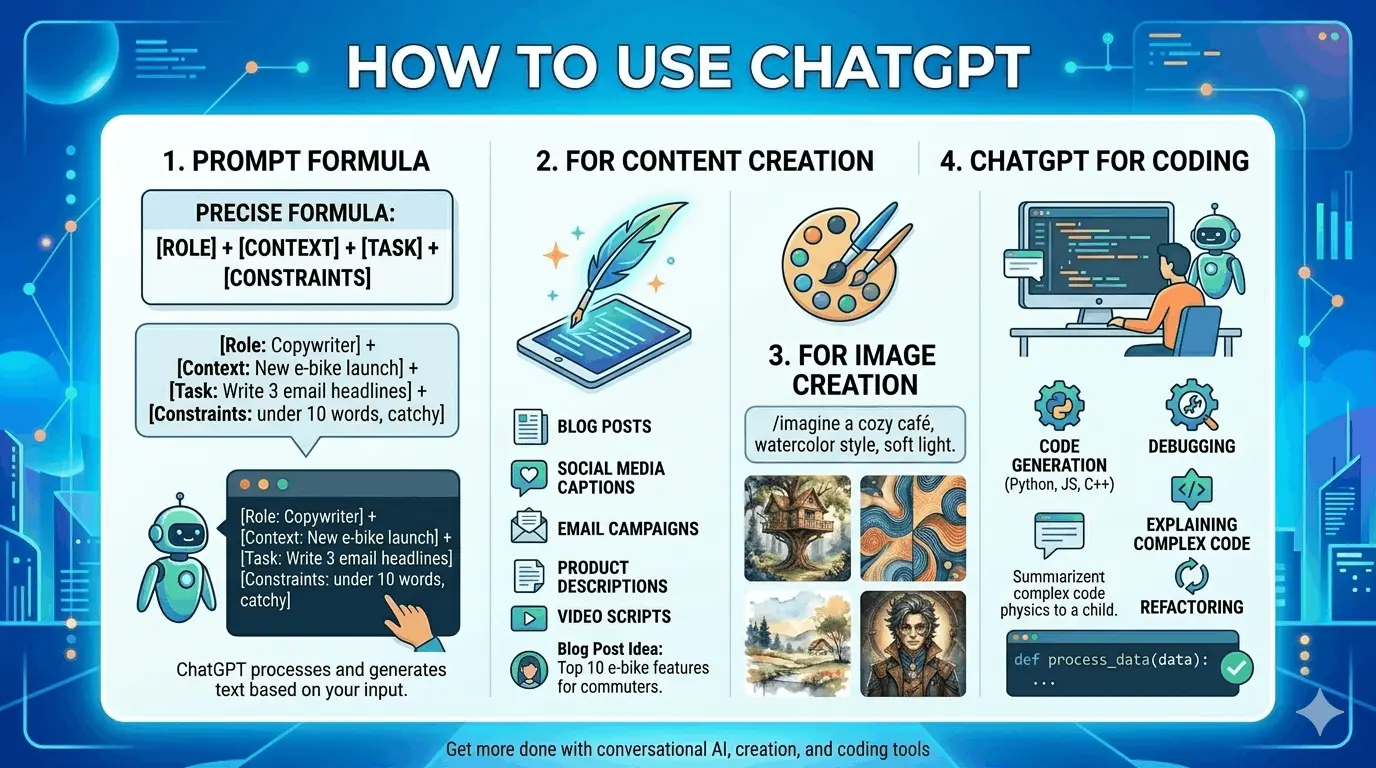
The 4-Part Prompt Formula — Get Better Answers
Most people use ChatGPT the wrong way. They type 1-2 words and get a bad answer. The secret to how to use it well is the 4-part prompt formula:
| Part | What to Include | Example |
|---|---|---|
| 1. Persona | Who should ChatGPT act as? | Act as a travel expert with 10 years of experience |
| 2. Context | What is the background? | I am planning a 7-day trip to Europe with ₹ 20,00,000 |
| 3. Task | What do you want done? | Create a day-by-day travel plan with top places |
| 4. Format | How should it look? | Give it as a table with Day, City, and Cost |
See the difference:
| Weak Prompt | Strong Prompt (4-Part Formula) |
|---|---|
| ❌ write email | ✅ Act as a teacher. Write a short polite email to a parent. Their child is doing well but needs more maths practice. Keep it under 100 words. |
| ❌ help with essay | ✅ Act as an English teacher. Write a 300-word essay on climate change for Grade 10. Use simple words and 3 main points. |
| ❌ make image | ✅ Create a 3D cartoon image of a cat in an astronaut suit floating in space. Use bright, fun colours. |
| ❌ marketing ideas | ✅ Act as a marketing expert. Give 5 Instagram post ideas for a small bakery called Sweet Dreams. Focus on getting more sales. |
🧠 Expert Tip: Use all 4 parts — Persona, Context, Task, and Format. Most people only use 1 or 2. Use all 4 and your answers will be much better.
New ChatGPT Features in 2026
ChatGPT has many new and useful features in 2026. Here is a full list:
| Feature | Available On | What It Does |
|---|---|---|
| 🔍 Deep Research | Free + Go + Plus | Searches 100s of websites and gives a full report with sources |
| 🎨 Image Generation | Free + Go + Plus | Create any image — just describe it in words |
| 🤖 Agent Mode | Plus / Pro only | ChatGPT takes real actions — books, fills forms, browses web |
| 🖊 Canvas Mode | Free + Go + Plus | Edit one part of text or code without changing everything |
| 📁 Projects | Free + Go + Plus | Save your files and chats in private folders |
| 📚 Study Mode | Free + Go + Plus | Asks YOU questions to help you learn — great for students |
| 👥 Group Chats | Free + Go + Plus | Chat with up to 20 people and ChatGPT at the same time |
| 🛒 Shopping Mode | Free + Go + Plus | Find and compare products and deals inside ChatGPT |
| 🔊 Voice + Video | Plus / Pro only | Talk to ChatGPT and share your screen in real time |
| 💮 Memory | Free + Go + Plus | ChatGPT remembers things about you from past chats |
| ⏰ Scheduled Tasks | Plus / Pro only | Set ChatGPT to do tasks at a time you pick — even while you sleep |
| 💻 Desktop App | Free + Go + Plus | Use ChatGPT on Windows or Mac with the Alt+Space shortcut |
How to Use ChatGPT for Content Creation
ChatGPT content creation is the top use. You can make almost any written content in seconds:
- Blog articles — give the topic and audience, ChatGPT writes the full article
- Social media posts — Instagram, Facebook, LinkedIn, and X (Twitter) captions
- Emails — professional or friendly emails done fast
- YouTube scripts — full script with a strong hook and call to action
- Ad copy — short, catchy ads for Google or Facebook
- Resumes and cover letters — ready for job applications
Try this Prompt: Act as a social media expert. I run a bakery called Sweet Dreams. Write 3 Instagram captions for a photo of fresh croissants. Make them fun and under 50 words each.
📝 Content Tip: Always tell ChatGPT the tone — funny, professional, or simple. Tell it who will read it. More detail = better answer.
How to Use ChatGPT for Image Creation
ChatGPT can now create images for free using GPT-5.3. No extra tool needed. This works on the Free, Go, and Plus plans. Here is how to use ChatGPT for image creation:
1. Open ChatGPT — Go to chatgpt.com and log in.
2. Describe Your Image — Type what you want. Include style, colours, and mood.
3. Add a Style — End with: realistic, cartoon, 3D, watercolour, anime, or sketch.
4. Download It — ChatGPT makes the image in about 10 seconds. Click and save.
Try these image prompts:
- A golden retriever puppy playing in autumn leaves — soft natural lighting, realistic
- A 3D cartoon logo for a gaming channel called Thunder Squad — blue and purple
- An anime girl reading a glowing book in a magical forest at night
🎨 Image Tip: Upload your own photo and say: Make this look like an oil painting. Most people do not know you can do this!
How to Use ChatGPT for Coding
It is one of the best free coding tools in 2026. It can save you hours of work. Here is how to use it for coding:
- Write code from scratch — describe what you need and ChatGPT writes it
- Fix broken code — paste it and say: Find and fix the error
- Explain code — paste any code and ask: What does this do in simple words?
- Convert code — change Python to JavaScript or any other language
- Build a website — get HTML, CSS, and JavaScript code written for you
Try this Prompt: Act as a Python teacher. Write a program that asks for a name and age. Print: Hello [name], you were born in [year]. Explain each line simply.
💻 Coding Tip: Use Canvas Mode when coding. It lets you fix one part without changing everything else.
ChatGPT for Students and Business
For Students
This AI Tool for students is like a free teacher and tutor — open 24/7. The new Study Mode in 2026 asks YOU questions to help you think and learn:
- Explain any subject in simple words — maths, science, history, and more
- Turn long chapters into short study notes
- Study Mode — gives you quiz questions and helps you learn step by step
- Solve maths problems and explain every step
- Translate text to or from any language
🎓 Student Warning: Always check ChatGPT’s answers. It sometimes makes mistakes. Use it as a helper — not as your final answer.
For Business
ChatGPT for business saves hours of work every day. Here are the top uses:
- Write emails, reports, and business plans in minutes
- Create marketing plans and social media content calendars
- Write job ads, interview questions, and onboarding docs
- Build customer support replies and FAQ pages
- Use Agent Mode to research, book, and fill forms automatically
Frequently Asked Questions (FAQ)
Q1. What is ChatGPT?
ChatGPT is a free AI tool by OpenAI. It answers questions, writes content, creates images, and helps with coding. In 2026, it runs on GPT-5.3.
Q2. Is ChatGPT free?
Yes. The free plan is at chatgpt.com.
Q3. How to use ChatGPT for image creation?
Describe the image you want, add a style (cartoon, realistic, anime), and ChatGPT creates it in seconds — free on all plans.
Q4. What is the 4-part prompt formula?
Persona + Context + Task + Format. Use all 4 parts to get much better answers from ChatGPT.
Q5. What is Deep Research in ChatGPT?
Deep Research searches hundreds of websites and gives you a full report with sources. Available on Free, Go, and Plus plans.
Q6. What is Agent Mode?
Agent Mode lets ChatGPT take real actions — browse the web, fill in forms, book things. Available on Plus and Pro plans.
Q7. What is Study Mode?
Study Mode is a new 2026 feature. It acts like a tutor — it asks YOU questions to help you learn, not just gives answers.
Q8. Can ChatGPT remember my past chats?
Yes. Turn on Memory in Settings > Personalisation. ChatGPT will remember details from all your past conversations.
Q9. Can I talk to ChatGPT with my voice?
Yes. Tap the microphone in the ChatGPT app. Plus users can also use Advanced Voice with live video and screen sharing.
Q10. Is ChatGPT safe for students?
Yes, but always check the answers. ChatGPT sometimes makes mistakes. Use it as a helper — your own thinking matters most.
Start Using ChatGPT Today!
Now you know how to use ChatGPT for content, images, coding, studying, and business. You have learned the 4-part prompt formula and all the new 2026 features — Study Mode, Group Chats, Agent Mode, and more.
ChatGPT is free, simple, and powerful. Go to chatgpt.com right now. Try your first prompt. Use the 4-part formula. See the difference. You will be amazed at what this one free tool can do every day.
ChatGPT is one of the best AI tools available today. But if you are looking for a full list of the best AI tools for digital marketing — including tools for SEO, ads, social media, and email — check out our complete guide here: Best AI Tools for Digital Marketing.