


In 2026, the area of artificial intelligence is changing how people learn and work, and ChatGPT plays an important roll in these changes.
What is ChatGPT
Chat gpt is one of the most powerful AI tool in 2026 which is a chatbot app built by open AI. It can perform many different tasks like coding, content writing , generate images, answer any question in minutes and help to increase our productivity and save time.
Key take away from this guide
What is chatgpt
How chatgpt Works
How to use chatgpt step by step
Is ChatGPT Safe to Use?
How to use chatgpt effectively
How to Customize ChatGPT
How to Use ChatGPT for Different Tasks
How Chat gpt Works
Before using the chat gpt you need to know about how it works so that you can use it effectively.
Chat gpt understands the providing data like question, image, prompt, voice and provide results, But results totally depend on your given prompt and command when you give clear and detailed instructions chat gpt will give you best results. Throughout this guide you’ll learn how to communicate effectively with chatgpt and all features.
How to Use ChatGPT Step by Step
Here you will learn how to use chat gpt step by step. These steps are the same across the Desktop and mobile app
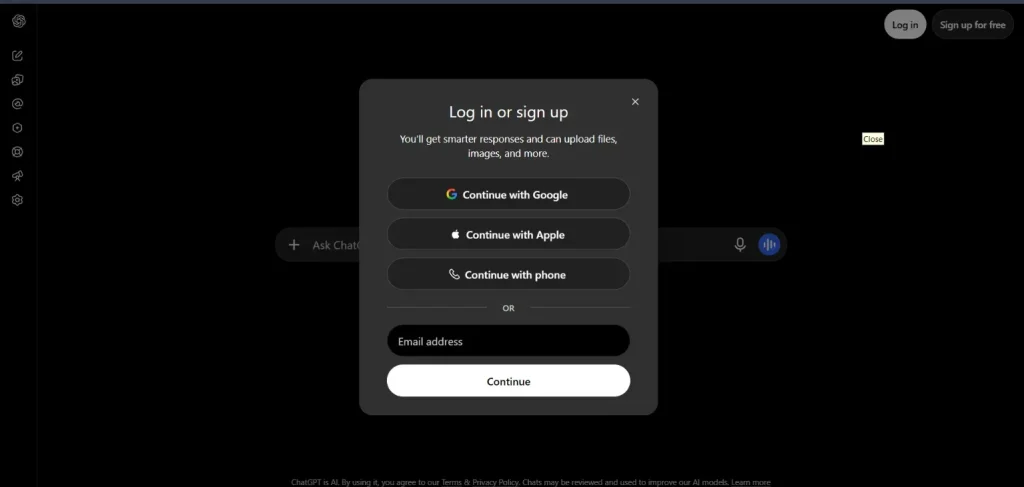
Step:-1 Log in and sign in to Chatgpt
Search on Chrome and other browsers: chatgpt.com
Log in and sign in with your number and gmail.
Easy way to sign in: click on Sign in and select Continue with google you will sign in without enter password and otp.
Mobile app as will as same login and sign-in method.
Note:- Take help from the provided images for better understanding.
Step:-2 Understand the Chatgpt Screen
Click on chat option and start a conversation with chat gpt.
Type your question and what you want in the simple language you know and press the enter button and wait for a response.
Note:- The following image provides details about all ChatGPT features.
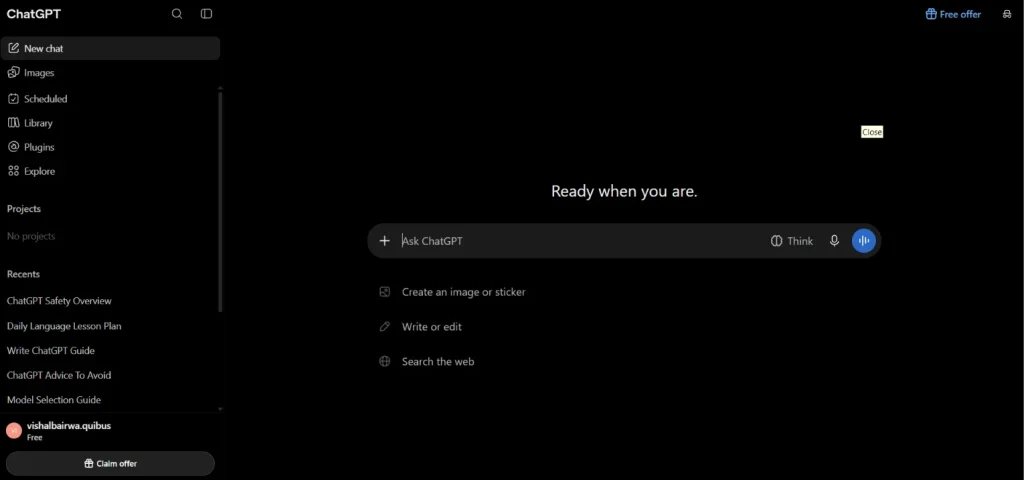
Tab on new chat option:- Tab on this button and start new conversion for your new fresh topic.
History list chat menu:- Present on your left side bar you can see your past conversion and pin you important conversion.
Images mode button:- This option for generating high quality graphics and images tap on the images button where you can see many different templates and image references which you can use for your project and work.
To avoid too much typing you can use the Mic feature of chat gpt:-
This feature is located in your chat option on the right side. It looks like a mic. You simply tap on and activate the voice feature and simply tell about your question and what you want and this feature automatically converts your voice into textMost useful feature of chat gpt is start voice feature:-
This feature works like a live call. You tap on the start voice button and start speaking your question and anything chatgpt responds with your voice.
Note:- Chatgpt can take sometime to analyse your giving text and information and provide answers and results which you want.
Is ChatGPT Safe to Use?
Yes chat gpt safe for general uses like writing, learning, and daily simple tasks like genrate pdf, images because it comes with certain privacy, security, and accuracy risks.
So, before providing your personal details and information, check the privacy points.
Don’t blindly follow ChatGPT recommendations. Before taking advice from professionals. Because ChatGPT is ai agent, not a human expert.
Which advice don’t take from ChatGPT ?
Medical and health advice
You don’t follow ChatGPT recommendations before taking advice from a doctor.
Financial & Career advice
Don’t take action on your financial and career decisions without exploring and consulting professionals.
Note:- Chatgpt can make mistakes so you can check your important information.
How to use ChatGPT Effectively
Most people don’t know how to use chatgpt effectively. Because they dont know about how to provide clear instructions to chatgpt and as results they don’t get results which they want.
If you want to get better results from chat gpt you should follow the provided steps.
Step:-1 Select the Chatgpt right mode according to your work and task.
Chat gpt has many different modes for different tasks and work. You can choose the right mode for your task and work. In the following table you will learn about how to select the right model for your work.
ChatGPT Mode / Model | Best For | When to Use |
|---|---|---|
Instant | Everyday tasks and quick answers | Content writing, basic research, summaries, and daily questions. |
Thinking | Complex tasks and problem-solving | Logical and deep analysis. |
High Thinking | Deep reasoning and advanced tasks | Complex research and technical problem-solving like coding and finding errors. |
GPT-6 | General-purpose AI assistance | When you need a balance of speed, reasoning, and quality. |
GPT-5.6 / GPT-5.5 | Previous-generation models | When you want to use an earlier model for a particular task or workflow. |
Voice Mode | Speaking and listening | Practising any language and asking qustions |
Tip: Choose Instant for everyday work and Thinking for tasks that require deeper analysis and reasoning.
Step:-2 write effective prompt for better results Follow The 4-Part Prompt Formula
This formula helps to write a good prompt for chat gpt which you can get better results.
In the following table explain how to use this formula for a better prompt with an example.
Part | What to Include | Example |
1. Persona | Who should ChatGPT act as? | Act as a businessman with 10 years of experience |
2. Context | What is the background? | I am planning to launch a product that costs under Rs 500 and has a margin of Rs 100 after cutting all expenses. |
3. Task | What do you want done? | Create a step-by-step plan with strategies |
4. Format | How should it look? | Give it as a PDF with strategy, cost, expenses, and margin. |
ChatGPT Free vs Paid Plans (2026)
Chat gpt provides free and paid plans but you select the plan according to your need.
If you are a beginner, you can go for a free plan.
If you are a professional and office worker you take padi plan.
How Can Decide Which Plan Best for You
The following table provides a short difference between paid and free plan so you can easily select your plan according to your need and requirement.
Feature | Free | Paid |
Basic conversations | Yes | Yes |
Advanced model access | Limited | Higher access |
File uploads | Limited | Higher limits |
Image generation | Limited | Higher access |
Data analysis | Limited | Higher access |
Advanced research | Limited | Higher access |
How to customize chat gpt
You can customize chat gpt according to your need so that it understands your response in right way and provides useful and relevant results.
You can do this by using features like Custom Instructions, Memory, Personality settings.
Follow the following steps and customise your chat gpt.
1 Step:- Custom Instructions.
1. Go to ChatGPT settings
2. Select Personalisation.
3. Find Custom Instructions.
4. Add details about your preferences, work, or response style.
Example:
“Explain to me difficult topics in simple hindi and Hinglish. Keep answers short and use examples and tables whenever helpful.”
2 Step:- Memory
Memory allows ChatGPT to remember useful details from your conversations and use them in future responses.
You can manage your chatgpt memory
Go to Settings and select personalisation
Find the memory option
Click on the Manage button, and you can edit your memory.
3 Step:- Customise ChatGPT’s Personality
You can adjust chat gpt communication style according to your need.
Use these settings you can customize chat gpt communication style
1. Base style and tone:- Choose how ChatGPT communicates.
2. Characteristics:- Adjust aspects such as warmth, enthusiasm, and formatting.
How to use chatgpt for different tasks
One of the biggest advantage of chatgpt is designed for flexible and different works.
You can use the chatgpt for different different tasks like learning, coding, image generation, content creation, daily problem solving.
How to use chatgpt for content creation
Chat gpt can help to content creation and generate different ideas of content writing. We can use it for blog writing, social media caption, description, and ad copies, scripts, generate, email writing, etc.
How to use chatgpt for coding
Chat gpt can help beginners and professional understand programing languages and fix their error, bugs
You can use chat gpt for understand programming languages, and fix errors, write code, improve code readability.
How to use chat gpt for students
If you are student of college and school doesn’t matter, chat gpt can help you in every subject and solve your problems in an easy way.
We can use chat gpt for make notes, take short revision which we learned in the past, ask questions and answers, make questions, and take tests of ourselves.